

Summary
- Video does not arrive ready: every frame must be decoded, color-converted and copied before becoming a tensor. At 30 fps per camera, that path runs all the time, before any AI.
- I measured it with a YOLO at the end of the path: the frame path consumes 75% of a stream's time, and at DVR scale software decoding breaks real time near 20 cameras, while NVDEC sustains 32 using 2 cores.
- Direct recommendation: torchcodec in the PyTorch ecosystem, PyAV when you need control, OpenCV for prototypes. Decord, no.
1. The cost that runs before any model
Every computer vision pipeline over video has two halves: the one that shows up in meetings, which is the model, and the one that shows up on the infrastructure bill, which is everything that happens before the frame exists.
Video is compressed data. A 1080p camera at 30 fps produces about 187 MB per second of raw RGB pixels; H.264 delivers that in a few Mbps precisely because each frame depends on its neighbors to be reconstructed. The bill is paid at read time: decoding means rebuilding pixel by pixel, frame by frame, all the time.
With one camera, that is a footnote. With twenty, the ratio flips: decode and preprocessing consume more cycles than inference, and the system's capacity ends up defined by a choice that is almost never discussed at design time: which library reads the video, and where the frame is born.
2. How a video becomes frames
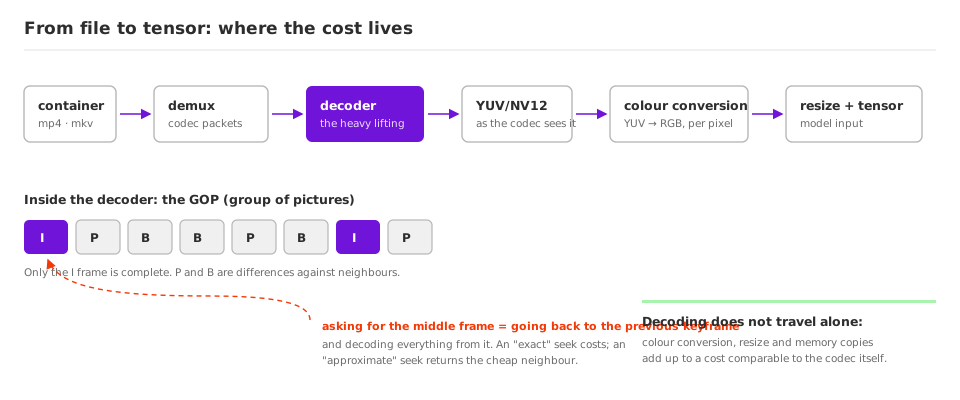
Four concepts explain practically every strange performance behavior in decoding. They apply equally to an .mp4 file and to the RTSP stream of a live camera: the envelope changes, the work does not.
Container is not codec. The .mp4, the .mkv or the RTSP session are the envelope; inside travel compressed packets of a codec such as H.264, HEVC or AV1. Separating the packets (demuxing) is cheap. Rebuilding pixels from them is the work. And RTSP has an operational difference files do not have: it does not wait. If the consumer falls behind, frames pile up or drop, which is why a decode bottleneck on a live camera shows up as lost frames, not as slowness.
Frames depend on each other. The codec groups frames into GOPs (groups of pictures): an I frame (keyframe) is a complete image; P and B frames store only differences relative to neighbors. That is what makes compression efficient, and it is what makes seeking expensive: asking for frame 500 requires going back to the previous keyframe and decoding everything since it. "Exact" seek pays that cost; "approximate" seek returns a cheap neighbor and is enough for training-time sampling.
The decoder does not output RGB. The result comes out in YUV (typically NV12), the color space codecs work in. Conversion to RGB is per-pixel arithmetic: at 4K 30 fps, 250 million pixels per second, per stream. I measured up to a quarter of the throughput going away in that conversion alone.
Memory copies are a stage, not a detail. If decoding happens on the CPU and the model runs on the GPU, every frame crosses the bus already decompressed, in full RGB, 30 times a second per stream.
3. The code, on both paths
CPU decoding with OpenCV, the starting point of almost every project:
import cv2

cap = cv2.VideoCapture("camera.mp4")   # or "rtsp://user:password@10.0.0.15/stream"
while True:
    ok, frame = cap.read()          # NumPy, BGR, on the CPU
    if not ok:
        break
    rgb = cv2.cvtColor(frame, cv2.COLOR_BGR2RGB)  # don't forget
GPU decoding with torchcodec, the frame born on the model's device:
from torchcodec.decoders import VideoDecoder

decoder = VideoDecoder("camera.mp4", device="cuda")   # NVDEC
frames = decoder.get_frames_at(indices=[0, 30, 60, 90])
# frames.data: uint8 tensor on the GPU, ready for the model
4. The numbers
The same video everywhere (60 s, 1080p at 30 fps, H.264 at 8 Mbps, the profile of an IP camera), datacenter GPUs, inference always on the GPU, best of three runs. There are two measurements, each answering one question: where a stream's time goes (on an A100) and how many cameras the machine sustains (on an H100 with 8 CPU cores, the size of a typical GPU instance).
One stream: where the time goes
I put a YOLO11n, the light detector typical of camera pipelines, at the end of both decode paths, with inference in batch 32.
Alone, the model processes the video's 1,800 frames in 0.76 second: 2,376 fps. That part of the pipeline is ready to work.
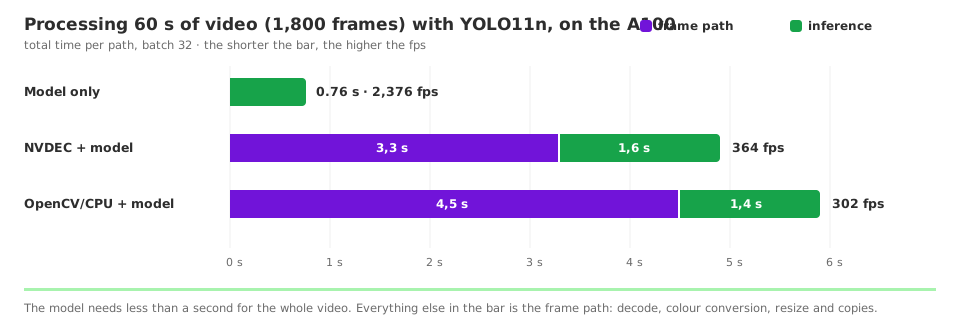
On the OpenCV path, the same video takes 5.9 seconds, and 4.5 of them are frame path: the GPU spends three of every four seconds waiting. Swapping only the decode to NVDEC cuts the wait without touching the model. Focus on the decode; the model can keep up. I even tested a model 8x heavier on the same pipeline and the clock barely moved, because the frame path is what runs it.
Notice that, with a single camera, the decode swap seems to yield little: 302 to 364 fps. Keep the reason in mind: with one stream, there is machine to spare on both sides, and the idle GPU hides the difference. The game changes when cameras add up, which is the second measurement.
Thirty-two cameras: who sustains real time
The design question is never a file's fps; it is how many cameras the machine holds at 30 fps each. The test has the shape of a DVR: the same machine (H100, 8 CPU cores), the same YOLO11n at the end, and the camera count climbing from 8 to 32.
| Cameras | Software decoding | NVDEC decoding |
|---|---|---|
| 8 | 627 fps · 7.4 cores | 1,192 fps · 2.1 cores |
| 16 | 582 fps · 6.9 | 1,261 fps · 2.2 |
| 24 | 543 fps · 6.5 | 1,136 fps · 2.1 |
| 32 | 521 fps · 6.3 | 1,175 fps · 2.2 |
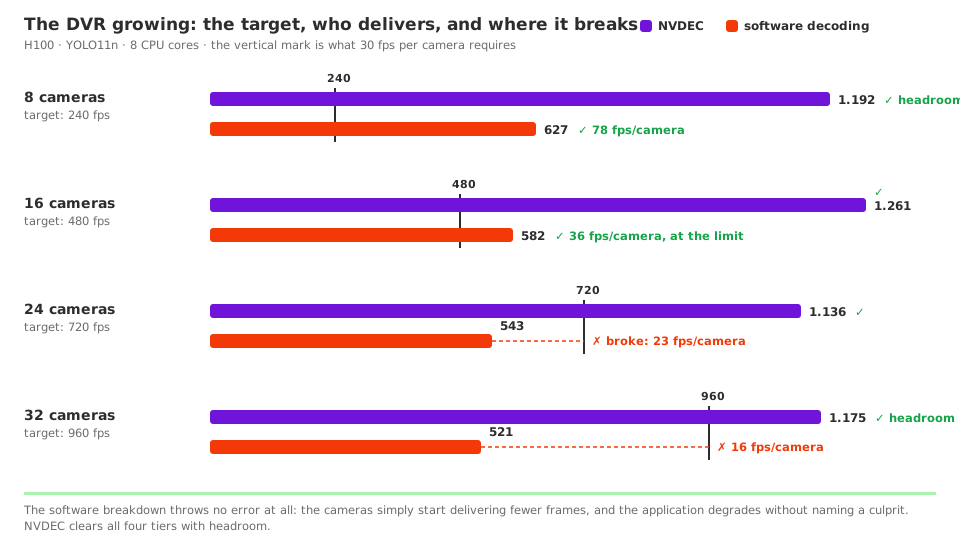
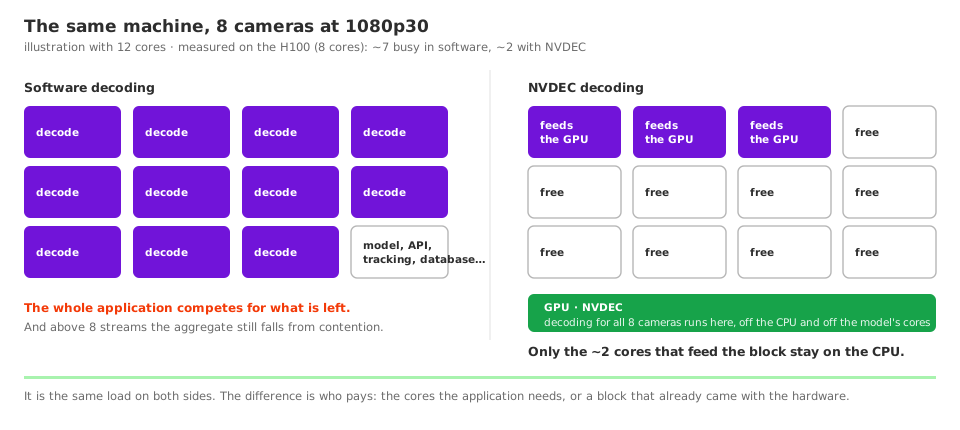
In software, the aggregate drops as cameras come in, with the 8 cores saturated the whole time: at 16 cameras there is still margin (36 fps per camera), at 24 there is not (23), at 32 it becomes 16. The system breaks real time near 20 cameras, and every new camera makes the existing ones worse. On NVDEC, the aggregate stays around 1,200 fps with 2 cores busy: the 32 cameras run with headroom, and 6 cores are left for the rest of the application.
5. Decoding on the CPU or on the GPU
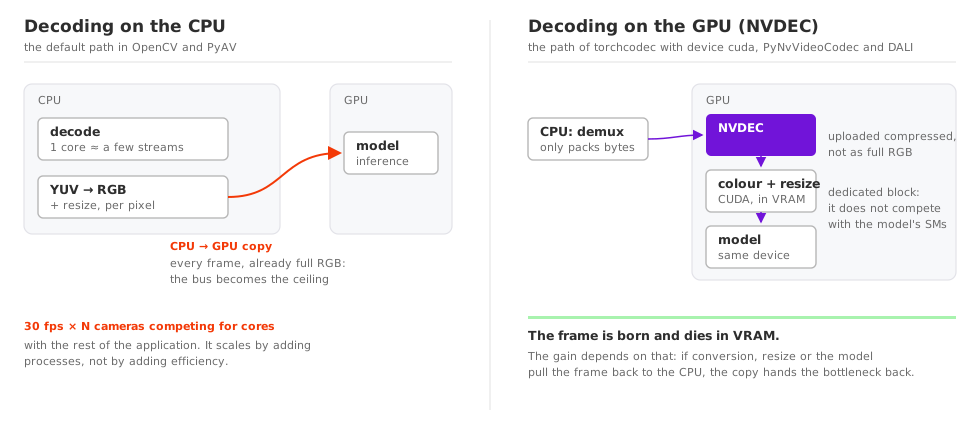
The hardware detail that explains the numbers: NVDEC is a dedicated block on the GPU, separate from the SMs (streaming multiprocessors, the compute cores) that run the model. Decoding on it steals no capacity from inference, and what goes up the bus is the compressed video, not raw RGB. NVIDIA publishes per-engine throughput in the NVDEC application note: 903 fps of 1080p H.264 on Ada (we measured 905), 2,172 on Blackwell, with HEVC faster than H.264 because the silicon is optimized for the newer codecs. Server cards carry multiple engines per chip; GeForce cards, one or two.
Three caveats before moving everything to the GPU:
- The gain dies if the frame comes back. NVDEC decoding followed by
.cpu()to resize with NumPy reinstates the copy the design had eliminated. Conversion, resize and augmentation must stay in CUDA, which is what torchcodec, DALI and the PyNvVideoCodec + CV-CUDA pair do. - Support depends on codec and card. H.264 and HEVC decode on any recent NVIDIA GPU; AV1 requires newer generations. The Video Codec SDK matrix answers per model.
- A single video will not show the gain. It was measured: on one file's throughput, software won. The dedicated block pays for itself on aggregate streams and freed CPU.
Beyond NVIDIA
Practically every modern processor carries a decode block; what changes is the name, the API and how much of it Python can see.
| Vendor | Block | Practical access from Python |
|---|---|---|
| NVIDIA | NVDEC | torchcodec, PyNvVideoCodec, DALI |
| Intel | Quick Sync (VVC/H.266 on Lunar Lake, market first) | PyAV/FFmpeg with hwaccel qsv or vaapi |
| AMD | VCN | PyAV/FFmpeg with hwaccel vaapi |
| Apple | Media engine (AV1 from M3 on) | PyAV/FFmpeg with hwaccel videotoolbox |
| ARM (SoCs) | Varies by vendor; Pi 5 only decodes HEVC | The SoC's FFmpeg/GStreamer |
Outside NVIDIA, the Python path is FFmpeg's hwaccel via PyAV, and the frame comes back to system memory, without the zero-copy the CUDA world offers. The cost pattern repeats on any block: on my M2 Max, VideoToolbox decoded the same 8 cameras in less than one core, where software spent eleven. Quick Sync is the most underrated: any Intel CPU with an iGPU decodes dozens of 1080p streams for free, on hardware that already exists (the typical rack Xeon has no iGPU; the gain applies to Xeon E, repurposed desktops and edge boxes). And AMD publishes no official VCN decode throughput; to size capacity, measure on the target hardware with ffmpeg -hwaccel vaapi. That documentation asymmetry is part of why NVIDIA dominates server video: it is not just the engine, it is knowing what it delivers before you buy.
6. The decode sets the ceiling
The model is the visible part of a vision pipeline, but it is the decode that defines how many cameras fit on each machine, and what the bill charges per month. Two decisions solve most of it: a maintained library aligned with the model's ecosystem, and the frame born on the device where it will be consumed.
Vision pipelines tend to be born as prototypes, reach production without review and spend years running single-threaded OpenCV on an oversized machine. The symptom is always the same: high CPU with an idle GPU. The fix rarely requires changing the model. It requires changing how the video is read.
How we help teams adopt AI
We work with engineering teams putting AI into the real development workflow, not as an experiment, but as an actual part of how the team ships.
That means choosing the right tools for the team's context, configuring them in a way that makes sense for the company's data policy, and making sure developers know how to use them in a way that genuinely increases productivity instead of adding friction.
If you have a development team and you're trying to put AI to work seriously, get in touch.