

Fourth of five posts on AI gateways. Before: why it exists, how to build it and what it costs in latency. After: the distilled SLM that cost 36× less.
Summary
- A local model is the only option that turns "I contractually agreed my data isn't retained" into "my data doesn't leave".
- An SLM is a 1-to-10-billion-parameter model trained for a domain. On narrow tasks it delivers close to the same result for a fraction of the cost.
- The VRAM math is in section 3. The generic break-even that circulates is misleading, and section 3.2 says why.
- The mistake is treating this as binary. It isn't "local or API". It's which route goes where — which is why this decision lives in the gateway.
- The five questions that decide whether it stands up in production — latency, concurrency, capacity, what happens when it runs out, and infrastructure — are in section 5.
1. What only a local model solves
There are three ways to reduce the risk of sending data to a model, and they are not equivalent.
Redaction at the boundary strips identifiers before the call leaves. Works well for personal data — national IDs, emails, phone numbers — and is mandatory if customer data is in the flow. It doesn't solve trade secrets, because there's no way to anonymize the logic of a proprietary algorithm without destroying the question.
A contract with the provider — zero retention, no-training clause, processing region. Reduces risk in a real way and rests on contractual trust. The data leaves; you agreed what happens to it.
A local model — the data doesn't leave. It's the only one of the three that turns a contractual guarantee into a technical one.
That difference sounds philosophical until you're in an audit. "We have a zero-retention clause" and "the traffic never left our network" are claims of different kinds, and the second doesn't depend on a third party's behaviour.
On which constraints make this mandatory, I wrote Your AI usage policy doesn't prevent the leak.
2. What an SLM is, and why it changed the math
SLM means small language model — in practice 1 to 10 billion parameters, trained or fine-tuned for a specific domain rather than competing on generality.
What changed isn't that they exist, it's their quality. A 7-to-14-billion-parameter model today handles narrow, well-defined tasks at a level that two years ago required a frontier model. And three properties come with it:
- Much lower inference cost. Public estimates cite reductions of up to 90% under high load.
- Lower latency. A compact architecture answers faster — which matters in interactive flows.
- It runs wherever you want. Laptop, company server, edge. That's what closes the problem in section 1.
The honest caveat: a 7-to-14-billion model does not match a frontier model on open-ended tasks. It ties on narrow ones and loses on anything requiring long reasoning, complex code, or synthesis over a lot of context.
Which is why the right question isn't "is a small model good enough". It's which of my tasks fit inside one.
3. The math
3.1 VRAM
Rule of thumb: roughly 0.5 GB of VRAM per billion parameters at 4-bit quantization.
An 8-billion model runs in about 4 to 5 GB. A 14-billion one, about 7 to 8 GB. That fits on a consumer GPU, and it's why this stopped being a large-enterprise topic.
3.2 The math isn't just cost per token
A simplified version of this calculation circulates, and it's misleading:
monthly token consumption × provider price vs fixed cost of the machine
It produces a number, and the number is almost always wrong — because four variables move the result more than token price does.
Load profile. Bursty and continuous load have opposite arithmetic. A pipeline processing batches occupies the GPU for a few hours a month; an interactive chat needs it running all the time. The same machine at the same price is cheap in one case and expensive in the other. That is what decided the result I measured in I swapped a proprietary LLM for a 9B open model.
Throughput and concurrency. Price per token assumes you extract nominal throughput from the hardware. In practice that depends on batching, how many simultaneous requests you have, and how much context each carries. An idle GPU waiting for a request costs the same as a working one.
Availability. The API has redundancy priced in. Locally you pay for it: a second machine, or accepting that the feature goes down when the GPU does. If the answer is "we accept it going down", fine — but that's a product decision and it needs to be made by whoever owns the product.
Locality and operations. Where the machine lives, who maintains it, who updates drivers and models, who gets called at three in the morning. None of that appears in a comparison spreadsheet and all of it is real cost.
The practical conclusion: don't use a generic break-even to decide. Measure your own load profile first — the GPU hours you actually consume, not the ones the formula suggests. And if the number doesn't work out, a local model may still be the right decision: it's just a compliance decision, not a cost one, and it needs to be approved as such. The mistake is selling internally as a cost reduction something that is a risk decision, because then the project gets judged on a result it was never going to deliver.
3.3 Ollama or vLLM
- Ollama for prototyping and low load. One command to start, and it's where you discover which tasks fit.
- vLLM for production. PagedAttention delivers far higher throughput under concurrency, which is exactly where Ollama stops serving.
The normal path is to start on Ollama to answer section 4's question, and move to vLLM when the answer is "several".
4. Which tasks fit
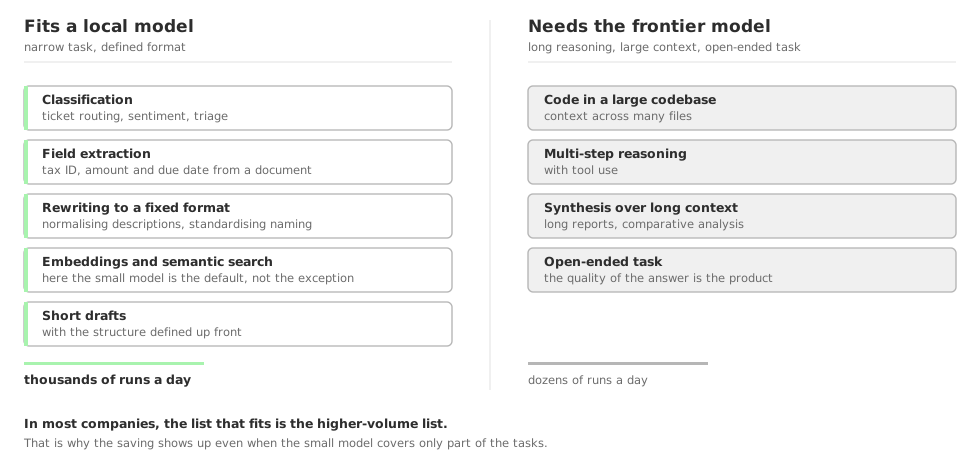
After running this with a few teams, the pattern is consistent. These fit well:
- Classification — ticket routing, sentiment, triage
- Field extraction — pulling a tax ID, an amount and a due date out of a document
- Fixed-format rewriting — normalising descriptions, standardising naming
- Embeddings and semantic search — here the small model is the default, not the exception
- Short drafts with a defined structure
These don't:
- Code in a large codebase, with multi-file context
- Multi-step reasoning with tools
- Synthesis over a lot of context — long reports, comparative analysis
- Anything open-ended, where answer quality is the product
Notice that the list that fits is, in most companies, the high-volume list. Classification and extraction run thousands of times a day; complex reasoning runs dozens. That's why the savings show up even when the small model covers only part of the work.
5. The five operational questions
Choosing the model is the easy part. These five decide whether it stands up in production, and none of them is answered by a published benchmark.
5.1 What latency do you need to deliver, and measured how?
Two different numbers, and confusing them is the most common mistake.
Time to first token is what a user feels in an interactive flow. Throughput in tokens per second is what decides how long a long answer or a batch takes.
An 8B model on a dedicated GPU returns the first token quickly with a single request. With thirty concurrent, the same model on the same GPU delivers the first token far slower, because the request queues.
Measure what matters for your case: for chat, TTFT at the concurrency you expect at peak. For batch, aggregate tokens per second. A single-request number predicts neither.
5.2 How many concurrent requests, and what limits them
Here is the variable almost nobody sizes: the limit isn't the weights, it's the KV cache.
Weights occupy a fixed amount — the VRAM arithmetic in section 3.1. The KV cache grows with concurrency × context length, and frequently exceeds the weights. An 8B model at 4-bit takes about 5 GB; thirty concurrent sessions with long context add several gigabytes on top.
When the cache fills, requests don't get slower — they queue. Latency doesn't degrade smoothly, it jumps.
That's why vLLM beats Ollama in production: PagedAttention is, in practice, a KV-cache memory manager. It isn't brand preference.
Size for peak concurrency, not for model size.
5.3 What is the machine's real capacity
The number you need is in no table: tokens per second at your target concurrency, with your context size.
You can establish it in an afternoon: bring the model up, fire synthetic load shaped like your real requests, and raise concurrency until latency leaves the acceptable range. The point where it leaves is your capacity.
Do that before promising an SLA, not after.
5.4 What happens when capacity runs out
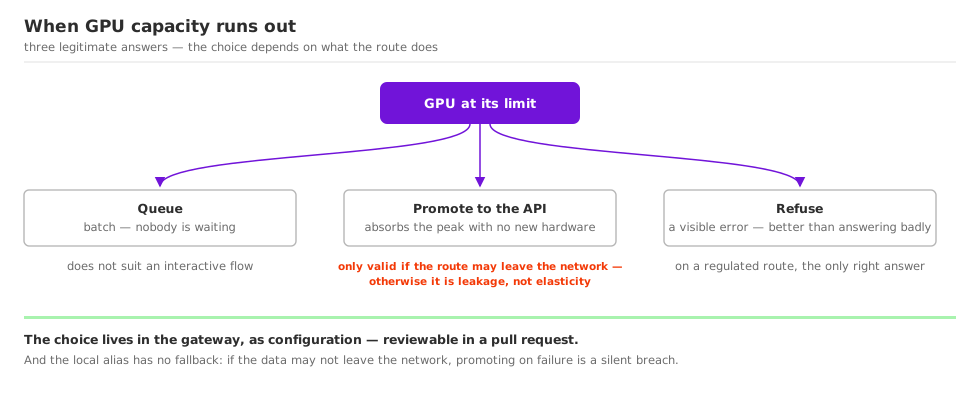
This is the question that separates a prototype from production, and it has three legitimate answers — the choice depends on what the route does.
Queue. Fits batch processing, where nobody is waiting. Doesn't fit an interactive flow.
Promote to a remote model. The request that doesn't fit on the GPU goes to the API. It absorbs peaks without provisioning hardware for them — and it is only valid if that route is allowed to leave the network. If the local model exists for compliance, promotion is a leak, not elasticity. Make that explicit in the configuration and in code review.
Refuse. Returning an error beats answering badly or violating the data policy. On a regulated route it's the only correct answer.
The gateway is where that choice becomes configuration instead of a code decision — which is what makes it reviewable in a pull request.
5.5 What infrastructure this actually requires
The GPU is the most visible item and the least work. What usually goes missing from the plan:
- Where the machine lives. GPU cloud, colocation or your own server. Each has different arithmetic and a different contract.
- Cold start. Ollama unloads the model after an idle period and the first request afterwards pays seconds of load from disk. vLLM keeps it resident. Anyone who demos on Ollama and reports low latency gets a surprise on Monday morning.
- Model updates.
qwen3:8bis a moving tag. Pin the digest and run your evaluation set on every update, or you change the production model without knowing. - Who operates it. Drivers, runtime versions, disk, VRAM monitoring, and who gets called when the GPU dies at three in the morning. It's recurring cost and it rarely enters the comparison against the API.
None of this rules out a local model. But if the justification was cost and these lines weren't in the arithmetic, the saving was smaller than it looked.
6. How this enters the routing
And here the four parts of the series meet.
The decision "this task goes to the local model, that one goes to the frontier model" should not live inside each application. If it does, you have the same sprawl as before, now with more providers.
It lives in the gateway, as a task alias:
  - model_name: fast              # high volume, narrow task
    litellm_params:
      model: openai/gpt-5-mini
      api_key: os.environ/OPENAI_API_KEY

  - model_name: local             # what must not leave your infrastructure
    litellm_params:
      model: ollama/qwen3:8b
      api_base: http://host.docker.internal:11434

  - model_name: deep              # reasoning, code, open-ended tasks
    litellm_params:
      model: anthropic/claude-sonnet-5
      api_key: os.environ/ANTHROPIC_API_KEY
The application asks for local and doesn't know which model is behind it. Swapping Qwen for a Llama fine-tuned on your domain is one line of YAML, with no application touched.
And the compliance rule becomes versioned: which route may leave the company and which may not turns into a pull request review, instead of a decision scattered across code.
And the warning worth more than anything else in this section: the local alias must have no fallback. If it exists because the data cannot leave the network, a fallback that rescues it on failure isn't a degraded answer — it's a silent compliance breach, at the exact moment the system was already in trouble. The config I publish deliberately puts no fallback on local. If you add a global fallback later, check that it doesn't catch that route.
6.1 The latency detail almost nobody anticipates
This is where the gateway's overhead stops being irrelevant.
Against an API call taking 2 seconds, the layer's ~10 ms is 0.5% — noise. Against a local model answering in 80 ms, the same 10 ms is 12%.
That's not a reason to take the gateway out of the path. It's a reason to know it before promising latency, and to consider a Go-based gateway if your local volume is high.
7. Where to start
If you have no contractual or regulatory constraint about where code runs, don't build local infrastructure. A zero-retention contract plus versioned configuration handles most of the risk, and you save the operational cost.
If you have high volume on a narrow task, do the section 3.2 math before anything else. If the volume doesn't clear break-even, the decision is about compliance and needs to be approved as such.
If the requirement is that the data doesn't leave, then it's a local model, and the work becomes mapping which tasks fit — which takes about a week with Ollama and a set of real cases.
In all three, the prior step is the same: knowing how many applications call a model today and what each one does.
How we help teams adopt AI
We work with engineering teams putting AI into the real development workflow — not as an experiment, but as an actual part of how the team ships.
That means choosing the right tools for the team's context, configuring them in a way that makes sense for the company's data policy, and making sure developers know how to use them in a way that genuinely increases productivity instead of adding friction.
If you have a development team and you're trying to put AI to work seriously, get in touch.